WINDOWS DOWNLOADS / CHOOSE THE RIGHT CONTROL
Windows download limits are not a cap for every launcher
Identify the content, its source and how the download started before treating a limit as broken.
Source check: November 27, 2026 | By David Bennett
Read the decision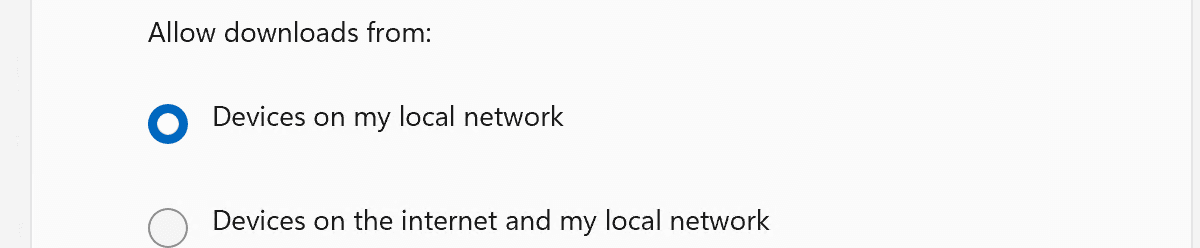
Microsoft example.
Credit: Microsoft. Official source
Delivery Optimization handles supported Microsoft downloads; its Settings controls are not a universal internet-speed cap. Microsoft specifically excludes manually started Windows Update and Store downloads from the documented bandwidth limits. Identify the transfer before changing a number.
Start with the content, not the size of the download
Microsoft lists Windows updates, Store applications and several other Microsoft products as Delivery Optimization content. Eligibility is more specific than a file being large or arriving on a Windows PC. Its table also separates the downloader from peer-to-peer support: Windows 11 Win32 Store apps and Xbox Game Pass for PC are listed without peer-to-peer support, even though they can use the downloader.
For a gaming household, that distinction matters before anyone changes a setting. A Microsoft game download is not automatically a candidate for another PC to supply its files. Equally, a Steam or other launcher transfer should not be assumed to follow a Windows Update limit simply because both use the same connection. Name the service doing the downloading first; then look for controls documented for that service.
Credit: Microsoft. Official source
View full-size image
Keep the manual-download exception in view
Windows Settings limits exclude manually started Windows Update and Store downloads. Find Delivery Optimization under Settings > Windows Update > Advanced options.

Credit: Microsoft. Official source
View full-size image
Peer sharing chooses sources, not a shared game folder
Delivery Optimization can obtain content from the original HTTP source, Microsoft Connected Cache and eligible peers. Microsoft describes peer-to-peer as a separate protocol, not SMB file sharing. Pieces received from peers are verified against known-good metadata; the original HTTP source remains available as a fallback. These are descriptions of the delivery mechanism, not a security assessment we performed.
Think of two PCs waiting for the same supported update. A peer may supply eligible content; it is not an invitation to browse the other computer or choose a game directory to copy. If your actual aim is moving an installed Steam game between PCs, investigate Steam's documented local-transfer feature instead. Treating these two services as interchangeable creates the wrong expectation before any bandwidth number is entered.
Decide whether you want peers at all
Microsoft's privacy guidance separates getting updates from participating in peer sharing. Turning off downloads from other PCs leaves updates and Store apps coming directly from Microsoft. It also says Delivery Optimization does not access personal files or folders. The sharing choice is therefore narrower than a choice to stop Windows updates or expose your documents. Peer choices distinguish local-network devices from devices on both the internet and local network.
A useful household decision starts with the desired behavior: direct Microsoft downloads, or eligible sharing with other devices. Keep that choice separate from a wish to pause an update or manage an unrelated launcher. Before a future change, note your existing choice and why you are changing it. Returning to that recorded choice would restore your intended preference; it would not undo traffic that had already crossed the connection.

Credit: Microsoft. Official source
View full-size image
Use the right evidence for the question
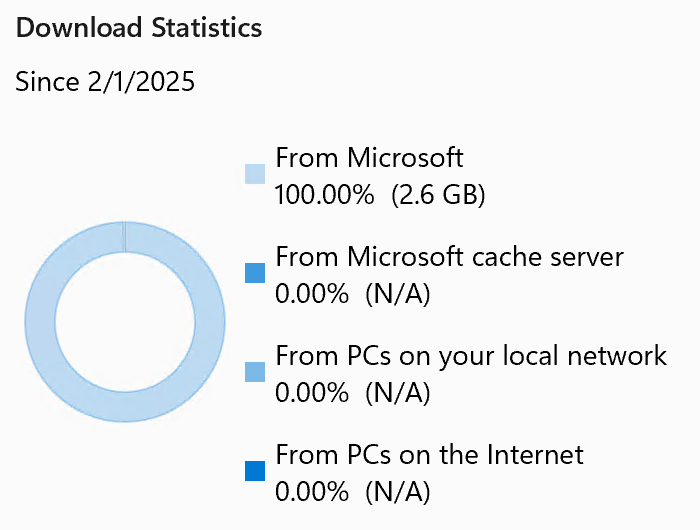
For deeper investigation, Microsoft separately documents monitoring tools that distinguish current Delivery Optimization jobs, their priority and bytes received from different source types. We have not run those commands or collected a household traffic trace for this article.
Match the evidence to the question. Whether an eligible transfer obtained bytes from a peer is different from whether a game felt responsive while it ran. An illustrative monthly chart cannot establish either result on your network today. If a problem persists, keep the Windows version, affected application, how the download started and the relevant message with your support request. Those details are more useful than assuming every simultaneous download belongs to the same service.
Consumer limits and managed policies need different reading
Microsoft's technical FAQ discusses foreground and background Delivery Optimization traffic and says LAN-peer downloads are not subject to its target-speed throttling. Its configuration documentation also describes organization-managed policies. Those technical controls are not permission to disregard the consumer Support page's manual-download exception, nor proof that a setting governs every transfer on a PC.
For a work- or school-managed computer, involve the administrator before trying another policy route. For your own PC, retain the original choices and make the smallest change justified by an identified transfer. This guide does not prescribe percentages, registry changes or firewall adjustments. If the question is really about a game launcher, return to that launcher's current documentation; if it is about the whole household connection, that is a separate network-management decision.
The decision
Identify the downloader, whether the transfer was automatic or manual, and whether peers are involved. Only then choose the relevant control. A Delivery Optimization setting is not evidence that every launcher or every device now follows one bandwidth cap.
Method and limits
Source-based decision guide using current Microsoft Support and Learn documentation, checked November 27, 2026. Four focused crops preserve the original Microsoft screenshots. No settings, downloads, commands or network measurements were executed for this reporting.
This explains documented scope, not measured performance. Consumer Settings and managed policies are distinct. Official screenshots contain example values; essential decisions are explained in the text rather than requiring small interface labels.
Sources
- Microsoft: Delivery Optimization in Windows
- Microsoft: how Delivery Optimization works
- Microsoft: Delivery Optimization and privacy
- Microsoft: supported content and delivery methods
- Microsoft: configuration and policy considerations
- Microsoft: Delivery Optimization frequently asked questions
- Microsoft: monitoring Delivery Optimization
Further reading
FINAL FANTASY RESONANCE / PARTY BUILDING What stays when you switch a Vision?
David Bennett · · 3 minGuide Your next handheld starts with three games.
David Bennett · · 6 minGaming audio • Research-led buying guide Five Gaming Headsets Compared
David Bennett · · 16 min